
Your team's game, in a corner.
A small window that stays on top and follows MLB games as a few quiet pieces. Free and open source.
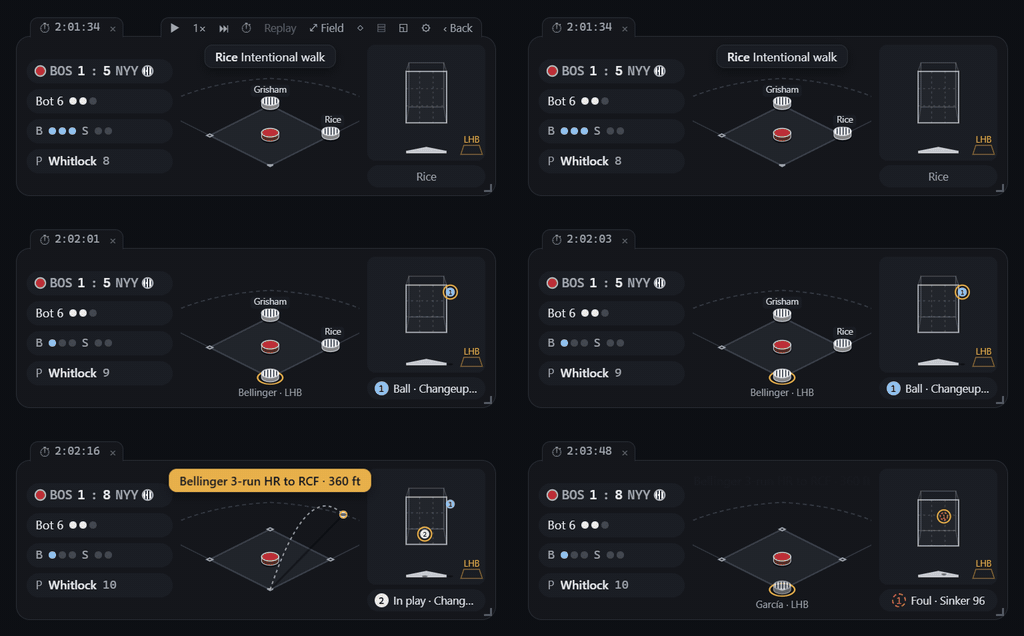
As big as you can spare.
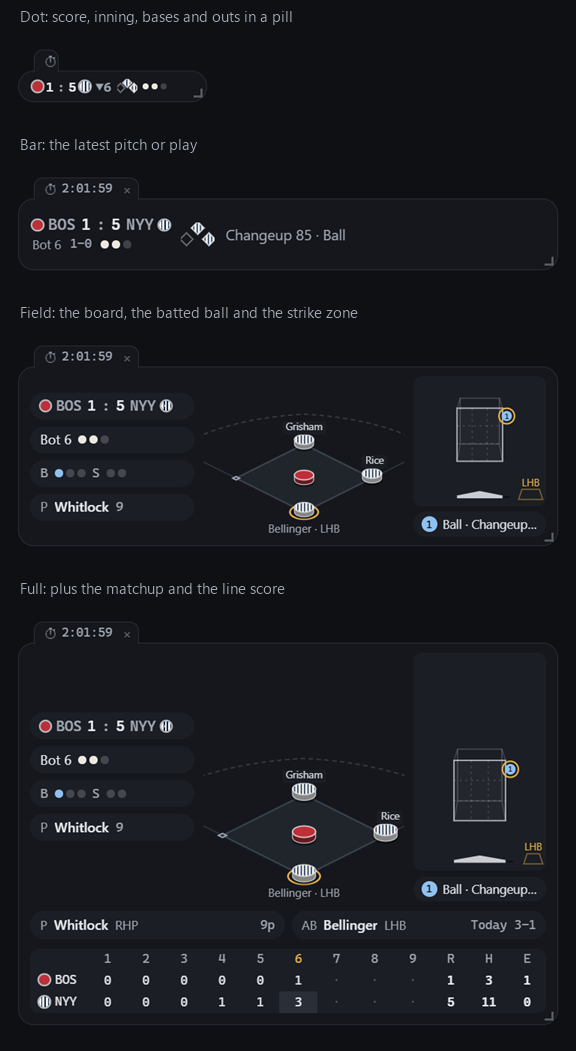
Drag the corner and it shows more, or less.
- Dot
- A pill with the score, the inning, the bases and the outs.
- Bar
- Adds the count and the latest pitch or play.
- Field
- Team-coloured pieces with runners' names, the flight of the ball, every pitch numbered in the zone.
- Full
- Adds the matchup and the line score.
Made to be glanced at.
- Follows your team. Live when they play, otherwise a countdown with the probable starters.
- Hides in a keystroke. Ctrl+Alt+Shift+B hides every window, and low-key mode turns it into a plain strip of numbers.
- Notices that never steal focus. A card in the corner for the plays you pick. Sound is off unless you want it.
- Every game today. A scoreboard drawer, postseason series labels, and a quiet tab when another game gets close late.
- Replays without spoilers. Games from 2023 on, at a pace that keeps the rhythm of each at-bat. Scores stay hidden while you pick.
- Hover to see who it is. Rest the pointer on a piece for the player's line so far today, and their regular-season and postseason totals.
- Lineup and pitchers. An optional window with the batting order, who is up and who is on deck, and every pitcher the fielding team has used.
- Your look. Flat or 2.5D, solid or see-through. Every style is a file you can write yourself.
Download
Basesmall runs on computers. If you would like a phone version, leave your email.
Windows
An installer that needs no administrator rights, or a portable zip for work PCs that do not allow installs.
macOS
One file for Intel and Apple Silicon, signed and notarized by Apple. Experimental: tried on an Intel Mac with macOS 26.
Windows may say it protected your PC, because the app is not code-signed yet: choose More info, then Run anyway. Windows needs the WebView2 Runtime, which Windows 11 includes.
Latest: . Every release and its notes are on GitHub.
Want it on your phone?
Basesmall runs on computers for now. If enough people want a phone version, it gets a serious look. Leave your email and you'll get one message when there is news, either way.
Kept: your email, the phone you picked, the language and the date, stored on Cloudflare. Used only for that one message, after which the whole list is deleted; never shared, nothing else sent. You can remove yourself any time: enter your email above and choose Remove my email.
Questions
Something else? Ask on GitHub.
Is this an official MLB app?
No. Basesmall is an independent fan project, not affiliated with MLB, MLB Advanced Media, the MLB Players Association or any team. Game data comes from MLB's public Stats API, fetched by your own computer, for personal, non-commercial use.
Does it cost anything? Are there ads?
It is free and open source (Apache License 2.0), with no ads and nothing to pay for.
Does it show video or play the broadcast?
No. It draws the game with a few pieces: runners, the count, the outs, the score, where each pitch crossed the plate and where the ball went. Sound is off by default, and there are only a few short cues you can choose.
Will a replay spoil the result?
No. Scores stay hidden while you pick a game, and in a replay the players' lines, the lineups and the pitchers only count up to the moment on screen. Games from 2023 on can be replayed.
Does it collect my data?
The app does not. No account, no server, no analytics: it talks to MLB for game data and asks GitHub once at start-up whether a newer version exists (you can switch that off).
Why does Windows say it protected my PC?
Because the app is not code-signed yet, not because anything is wrong. Choose More info, then Run anyway. The source is public on GitHub, and the installers are built from it there.
Does it work on a Mac or on Linux?
Yes, as experimental builds. The macOS build is signed and notarized by Apple, one file for Intel and Apple Silicon; Linux has an AppImage and a .deb.
How do I update?
When a newer version is out, the installed app shows a dot on its settings button; press Update in settings and it downloads, installs and restarts. Nothing happens until you press it. For the portable zip, download the new zip.
Does it cover other leagues?
Only MLB for now, regular season and postseason. Other leagues have no public play-by-play data it could use.
Runs on your own computer.
The app needs no account and has no server, no ads, no analytics. Game data comes straight from MLB's public Stats API to your machine, and the app asks GitHub once at start-up whether a newer version exists (you can switch that off); an update is only downloaded when you press Update.